


Research Spotlight
Distinguishing a Salmonella vaccine strain from native Salmonella Typhimurium strains using MALDI-TOF mass spectrometry
Christopher L. Anderson and Joel J. Maki
Food Safety and Enteric Pathogens Research Unit, National Animal Disease Center, Agricultural Research Service, United States Department of Agriculture, Ames, Iowa, USA
Nontyphoidal Salmonella causes approximately 1.3 million infections annually in the United States, costing an estimated $17.1 billion. Live-attenuated Salmonella vaccines effectively reduce Salmonella in poultry flocks, but these vaccine strains can persist in birds through production and be detected on food products. The USDA Food Safety and Inspection Service (FSIS) categorizes establishments based on how often Salmonella is found in their products, and it excludes vaccine strains from those counts. FSIS currently uses whole genome sequencing to distinguish vaccine strains from native Salmonella strains, but sequencing and analysis take time, delaying reporting and corrective actions. We hypothesized that an alternative technology, matrix-assisted laser desorption/ionization time-of-flight (MALDI-TOF) mass spectrometry, which generates a protein “fingerprint” from a bacterial colony within minutes, could identify Salmonella vaccine strains accurately and quickly.
In this proof-of-concept project, we collected MALDI-TOF spectra from isolates of Megan Vac 1, a live-attenuated Salmonella Typhimurium vaccine strain widely used in poultry production, and from native strains of Salmonella Typhimurium. Using SCINet infrastructure, we established a reproducible computational environment where we could collaborate on the analysis. We ran a pipeline to clean and transform 446 spectra in parallel before employing statistical analyses and machine learning using RStudio Server on the Ceres supercomputer. Multivariate analyses of spectral peak intensities showed that vaccine strains could be distinguished from native strains, but also that MALDI-TOF spectra exhibited strong temporal drift that we had to account for. To test performance under realistic conditions, we trained random forest models on spectra collected at earlier time points and evaluated them on later collected spectra. Models built from a subset of temporally stable peaks achieved a maximum balance accuracy of 97.4% on spectra collected at later time points. A model trained on the intensity of a single protein peak at 6046 mass-to-charge ratio (m/z) performed nearly as well (Figure 1; 97.0% balanced accuracy, 97.8% sensitivity, and 96.2% specificity). We then used SCINet resources to identify proteins that could produce the peak at 6046 m/z. Three proteins encoded by Megan Vac 1 matched the predicted mass, including one associated with a prophage. Megan Vac 1 has disruptions to genes that regulate metabolism, and disruptions like these often induce expression of prophage genes, which may explain why this peak is more intense in Megan Vac 1 strains.
Our findings demonstrate that MALDI-TOF mass spectrometry can accurately differentiate the Megan Vac 1 vaccine strain from native Salmonella Typhimurium strains. Using MALDI-TOF mass spectrometry to identify vaccine strains requires no additional sample preparation or equipment, as FSIS and other regulatory laboratories already use MALDI-TOF mass spectrometry for bacterial identification. Beyond cost savings, this approach enables faster reporting of Salmonella performance categorization. It also supports fair performance categorization by continuing to exclude live-attenuated vaccine strains, which in turn improves food safety and public health.
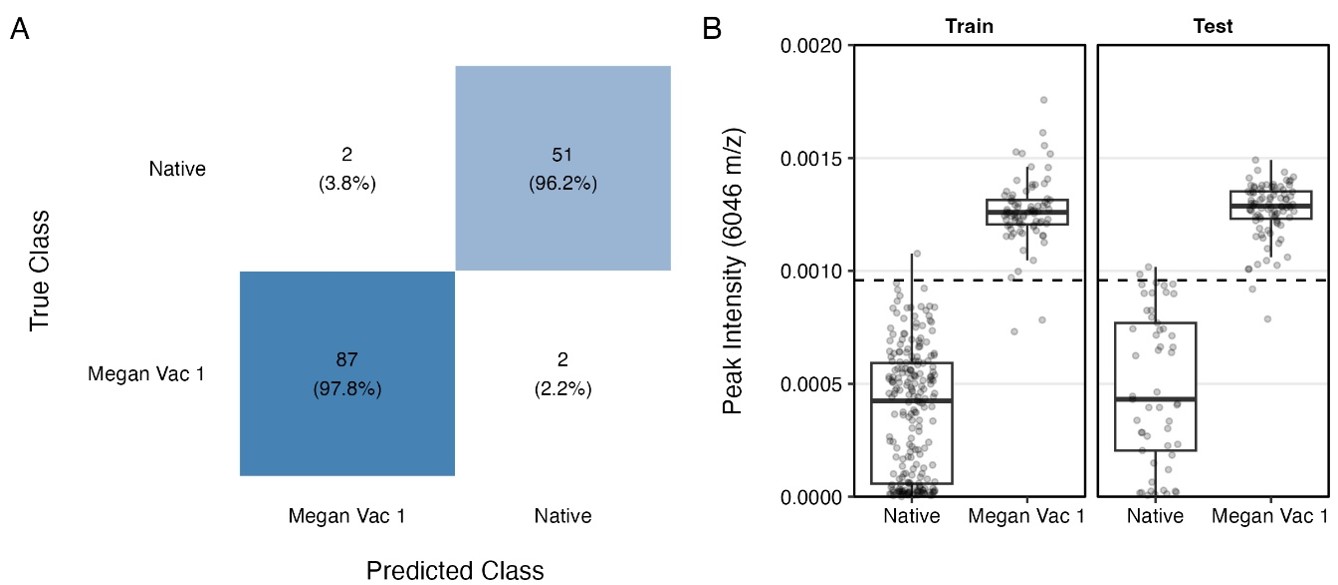 Figure 1. Classification of Megan Vac 1 and native Salmonella Typhimurium strains based on the 6046 m/z peak. (A) Confusion matrix for a decision tree classifier trained using the peak at 6046 m/z and evaluated on the temporally separated test set. (B) Intensity distributions of the 6046 m/z peak in native Salmonella Typhimurium and Megan Vac 1 spectra from the training and test sets. The dashed line indicates the classification threshold established by the decision tree model. Anderson et al., 2026, in review.
News
Apply now to serve as an applied research computing graduate student internship mentor in 2027!
We are accepting applications to serve as an ARS applied research computing graduate student internship mentor in 2027! These internships allow graduate students at our partner universities who have strong data science and computational skills to spend either a summer or a semester working full time with an ARS mentor (or mentors) on an ARS research project. Please note that ARS mentors are not required to have specific data science or computing expertise! Rather, their role is to guide the scientific direction of the project and to contribute to the intern’s professional development.
Internships are 10-13 weeks in length and include competitive stipends and travel funding for participants to spend time onsite with their ARS mentor(s). We are working with three partner universities to recruit student participants. We want each of our interns to have an outstanding experience, which means we need outstanding ARS mentors and research projects!
If you are interested in participating, please visit the mentor application page for more information about how to prepare and submit your application.
Applications are due by COB on Friday, December 4, 2026.
FY27 SCINet Postdoctoral Fellowships call for proposals
SCINet is again offering postdoctoral fellowship funding to ARS scientists who wish to mentor SCINet fellows working in their labs. These fellowships provide an exciting opportunity for participants to advance agricultural research by developing and applying new and emerging scientific computing technologies, such as big data analytics, computationally intensive methods, GPU-based computing, and machine learning (including deep learning and generative models). Fellows will be able to conduct research in collaboration with ARS scientists, use SCINet’s high-performance computing clusters and other computational resources, and access the numerous training opportunities available through SCINet.
For information and to submit a proposal, please visit the proposal application page.
The deadline for applications is COB on Friday, December 4, 2026.
FY27 Advanced Research Computing Innovation Fund awards call for proposals
We are accepting applications for FY2027 Advanced Research Computing (ARC) Innovation Fund awards to support research projects that apply modern computational methods, such as machine learning (including deep learning and generative models) and advanced data science techniques, to agricultural research or that develop new software tools or data products that support the application of these methods to agricultural research. We expect to fund 4 to 6 projects up to $100,000 each. Funds will need to be spent this fiscal year, so projects should have a short budget timeline or involve partnerships that can be funded through collaborative agreements.
Please visit the ARC Innovation Fund page for more information and for application instructions.
The deadline for applications is COB on Friday, December 4, 2026.
Ceres maintenance update: new QOS definitions
SCINet’s Ceres supercomputer underwent routine maintenance on October 12 that included a variety of upgrades and improvements. Most of these changes are not directly user-facing, but one change you might notice is that the “Quality of Service” (QOS) definitions have been updated to better reflect the partitions now available on Ceres and how they are used. (See the updates in our July newsletter for more information about recent partition changes on Ceres.) In Slurm, a QOS defines the resources available to a job and how the scheduler should handle the job.
Previously, Ceres had a multitude of QOS definitions which have now been simplified to the following:
-
“ceres”: The default QOS for all jobs submitted to the “ceres” partition.
-
“scavenger”: The default QOS for all jobs submitted to the “scavenger” partition.
-
“debug”: A high-priority QOS with a maximum job time of 30 minutes, used for job debugging and troubleshooting.
-
“sandbox”: The only QOS available to SCINet users without a SCINet project.
Most of the time, you do not have to think about QOS definitions at all: you can simply submit jobs to your desired partition (usually “ceres”) and Slurm will automatically apply the appropriate QOS. The one important exception to this is if you want to submit a job using the “debug” QOS, which can be useful for quickly troubleshooting job submissions. The “debug” QOS has a short maximum job time of 30 minutes but high priority, which means jobs will usually start quickly. For more information about using the “debug” QOS, see the user tip below!
Technically, all of the old QOS definitions on Ceres are still available (although they are hidden in Open OnDemand), but they will be removed during the next Ceres maintenance, scheduled for February. If you have job scripts that use the old QOS definitions, please update them to use the new, simplified QOS definitions outlined above.
Atlas maintenance update
SCINet’s Atlas supercomputer underwent routine maintenance on October 20. This maintenance event did not result in any major user-facing changes. The only change you might notice is that the “ood” “Quality of Service” (QOS) definition no longer appears as an option for Open OnDemand interactive apps. This QOS definition was still available for historic reasons and is no longer needed. (See the Ceres update, above, and the user tip, below, for more information about QOS definitions on SCINet’s supercomputers.) A big part of this maintenance event was preparing the core Atlas infrastructure for the installation of new compute and GPU nodes this fiscal year.
Enhancing location access to SCINet infrastructure: FY2026 update
Through the SCINet-X project, SCINet has established dedicated, high-speed connections to SCINet computing and data storage systems for nearly all ARS locations. These connections facilitate efficient transfers of large datasets, but they require using a local “café machine” for access to the high-speed connection. We know from conversations with many SCINet users that this can be inconvenient, and we have developed a more flexible solution that supports expanding high-speed access to any local computing device that needs it. Our long-term goal is to make the café machines obsolete by offering SCINet users high-speed data transfer capabilities directly from their local workstation or laptop. We are pleased to report significant progress on this effort in FY2026, during which we were able to expand SCINet access (and eliminate the need for café machines) at nineteen ARS locations. We are excited to continue pushing this effort forward in FY2027! Please contact us if you have questions or would like to learn more about the plans for your research location.
SCINet Working Groups
SCINet working groups support ARS researchers and their collaborators in using scientific computing methods and SCINet computational resources in their research. Common WG activities include hosting recurring virtual meetings and webinars, organizing training events, and participating in collaborative research or software development projects.
The March 26, 2026 SCINet Corner featured short presentations from four SCINet working groups. Check out the session recording to learn more about these working groups and how you can get involved!
If you are interested in creating a working group, please compile the following:
- The working group’s name
- A description of the working group including its purpose and goals
- Contact information for people to reach out to if they want to learn more about or join the working group.
Send this information to the SCINet office at ARS-SCINet-Office@usda.gov.
Training
Training workshops
The Carpentries Unix, Git, and R Workshop
Leads: SCINet Office, ARS-certified Carpentries Instructors
The SCINet Office, in collaboration with ARS’s certified Carpentries instructors, is offering a Carpentries workshop that will teach participants the Unix command line, version control with Git, and R programming. The workshop will span two weeks:
- November 10 & 12, 2026, 1 – 5 PM ET: Unix command line and version control with Git
- November 30 & December 2, 2026, 1 – 5 PM ET: Programming with R
This workshop will provide an interactive, hands-on experience that will help you learn valuable skills for data management and analysis.
To register for the Unix, Git, and R Carpentries workshop, please fill out this form.
Software Package/Environment Management
Lead: SCINet Office
On December 8 & 10, 2026, the SCINet Office will be leading a 2-day workshop on Software Package/Environment Management.
In this workshop, we will cover best practices for managing software packages and computing environments on SCINet’s supercomputers. This will be a hands-on workshop that will provide you with the practical knowledge and skills you need to spend less time worrying about package management and more time focusing on your research!
Here is a daily breakdown of the topics:
-
Day 1, December 8, 1:00 PM - 4:30 PM ET: Introduction, Python & conda
-
Day 2, December 10, 1:00 PM - 4:30 PM ET: R
To register for the Software Package/Environment Management Workshop, please fill out this form.
The Carpentries instructor training
SCINet is collaborating with The Carpentries to offer The Carpentries’ Instructor Training Course for ARS scientists. In this course, you will learn about evidence-based practices for effective and inclusive teaching, with a particular focus on teaching computational skills. There is no fee charged to course participants, but seats are limited. If you are interested in becoming a Carpentries-certified instructor, please complete this form.
Coursera
The SCINet Office is excited to provide training opportunities through Coursera. Coursera licenses are available to ARS scientists and support staff for training focused on scientific computing, data science, artificial intelligence, and related topics. Successful completion of courses and specializations result in widely recognized certificates and credentials.
Please visit the SCINet Coursera Training Page to request a license. Licenses will be assigned on a rolling basis and are active for three months. Users may be able to extend their licenses upon request.
Please help us improve our training offerings!
What scientific computing training do you need? The SCINet Office’s goal is to provide training opportunities and resources that meet the needs of ARS researchers, so we would be grateful if you could complete our short training request form and let us know how we can best help you learn the computing skills you need. Your feedback will help us decide where we should focus our efforts over the next year and beyond.
Training opportunities are continually being updated on the SCINet Upcoming Events webpage. For more information on any of the above trainings, registration questions, or suggestions, please email SCINet-training@usda.gov.
Support
Getting Started with SCINet is as easy as 1,2,3
If you do not already have a SCINet account, we hope you will consider joining the 2,300+ researchers who do. Follow the steps below to get started with SCINet.
- Request a SCINet account to gain access to computational and training resources.
- Read the SCINet FAQs covering helpful topics such as account management, accessing and installing software, obtaining storage space for your project(s), and how to get technical help.
- Visit the SCINet Forum to connect to other users, ask questions, and learn how SCINet can enable your research. P.S. Don’t forget to complete your annual USDA information security awareness training! This is required to maintain your account. For technical assistance with your SCINet account, please email scinet_vrsc@usda.gov.
Support email addresses
All requests for help with user accounts, login problems, resource requests, or support for the Ceres HPC cluster should be sent to the SCINet Virtual Research Support Core (VRSC) at scinet_vrsc@usda.gov. Help requests specific to the Atlas HPC cluster should be sent to help-usda@hpc.msstate.edu.
Many emails are currently being sent to other SCINet email inboxes. For the most expedient response to your support requests, be sure to send them to scinet_vrsc@usda.gov or to help-usda@hpc.msstate.edu for Atlas-specific requests.
SCINet User Tip
Using the “debug” QOS on Ceres and Atlas
When a supercomputer is busy or the resources you need are in high demand, a batch job might have to wait in the queue for quite some time (hours, e.g.) before it runs. It can be frustrating if, when the job finally does run, it immediately fails due to a bug in your sbatch script or elsewhere in your code. To avoid this situation, it is very helpful to be able to quickly launch a job to verify that it works as expected or, if not, iterate on fixing any problems.
This is exactly what the “debug” Quality of Service (QOS) definitions on Ceres and Atlas are for! Among other things, a Slurm QOS can define the priority a job has for scheduling as well as its maximum running time. On both Ceres and Atlas, submitting a job with the “debug” QOS gives the job a higher priority than usual, but it also limits the maximum running time to 30 minutes. This combination is often perfect for debugging: the higher priority and short running time mean that Slurm will start the job very quickly, which is ideal for iterative testing when developing sbatch scripts for long-running jobs. Once the script is ready, it can be submitted without the “debug” QOS and will then be queued as usual, without elevated priority or short running-time restrictions.
To submit a job using the “debug” QOS, use sbatch’s --qos (or -q) option. For example, suppose you have an sbatch script called “important_job.sh”. To submit your job using the “debug” QOS, you could run:
sbatch --qos=debug important_job.sh
Remember that the maximum job running time for the “debug” QOS is 30 minutes, so if your sbatch script specifies a longer running time (which will usually be the case!), the command above will fail. In that case, you can override the running time in the script by setting a shorter maximum running time from the command line. For example:
sbatch --qos=debug --time=00:10:00 important_job.sh
That way, you can submit your job with a shorter time request without modifying your sbatch script.
Do you have tips to share? Email them to ARS-SCINet-Office@usda.gov to be included in future newsletters.
SCINet Corner
SCINet Corner is a VRSC-moderated virtual space for people to share knowledge, discuss best practices, learn about new opportunities, and explore resources to support progress on their projects.
The next SCINet Corner will be held on December 3, 2026, from 1 – 2 PM ET. December’s event will be an open question and answer session. Please bring your questions and research computing challenges and we will do our best to help! We also invite you to submit any SCINet-related questions, challenges or concerns you’d like us to address by filling out this short form.
Have a question that just can’t wait? Want to see what other users are doing? Reach out to the ever-expanding SCINet Forum community for ideas, support, or just someone to bounce ideas off of at https://forum.scinet.usda.gov/.
Connect
The SCINet Community
To see all the SCINet community updates and review past newsletters, visit the Newsletter Archive.
Contribute
Do you use SCINet for your research? We would love to share your story! Email ARS-SCINet-Office@usda.gov to contribute content, ask questions, or provide feedback on the SCINet newsletter or website.
SCINet Office
Haitao Huang, Computational Biologist
Moe Richert, Web Developer
Lavida Rogers, Training Coordinator
Heather Savoy, Computational Biologist
Brian Stucky, Computational Biologist, Acting Chief Scientific Information Officer
SCINet Leadership Team
Brian Stucky, Acting Chief Scientific Information Officer
Rob Butler, SCINet Program Manager
Hye-Seon Kim, Scientific Advisory Committee (SAC) Chair
Jeff Silverstein, Associate Administrator