



Genome annotation takes raw genome assemblies and adds biologically meaningful gene models. In this two-day, hands-on workshop, participants will learn how to build, evaluate, and interpret gene models with an emphasis on understanding how gene models are built and how biological function is assigned.
By the end of the workshop, participants will have a clear understanding of how gene models are generated, how different annotation strategies compare, and how to interpret and assign function to genes in a biologically meaningful way.
Tutorial Setup Instructions
Steps to prepare for the tutorial session:
-
Login to Ceres Open OnDemand. For more information on login procedures for web-based SCINet access, see the SCINet access user guide.
-
Open a command-line session by clicking on “Clusters” -> “Ceres Shell Access” on the top menu. This will open a new tab with a command-line session on Ceres’ login node.
-
Create a workshop working directory by running the following commands. Note: you do not have to edit the commands with your username as it will be determined by the $USER variable.
mkdir -p /90daydata/shared/$USER/genome_annotation cd /90daydata/shared/$USER/genome_annotation cp -r /project/scinet_workshop2/foundations_bioinf_2026/genome_annotation/files/* . -
Launch VS Code:
- Under the Interactive Apps menu, select VS Code
- Specify the following input values on the page:
- Account: scinet_workshop2
- Queue: ceres
- QoS: ceres
- Number of cores: 4
- Memory required: 10G
- Number of hours: 5
- Optional Slurm Parameters:
--reservation=foundations_workshop - Working Directory:
/90daydata/shared/$USER/genome_annotation/
- Click Launch. The screen will update to the Interactive Sessions page. When your VS Code session is ready, the top card will update from Queued to Running and a Connect to VS Code button will appear. Click Connect to VS Code.
Genome Annotation
by Viswanathan Satheesh, Sivanandan Chudalayandi and Rick Masonbrink
Genome assemblies, especially in plants and eukaryotes in general, contain a significant proportion of repetitive elements: transposons, retroelements, simple repeats, and satellite DNA. These elements can make it harder to perform genome annotation, confound gene prediction tools, and inflate assembly size. To accurately annotate genomes, it is crucial to identify and mask these repeats prior to downstream analyses like gene prediction (e.g., with BRAKER) or comparative genomics. Two widely used tools in this process are RepeatModeler and RepeatMasker.
-
Repeat Identification and Masking
RepeatModeler – Building a Custom Repeat Library
RepeatModeler is a de novo transposable element (TE) discovery tool. It identifies repeat families in a genome without prior knowledge by combining multiple tools like RECON, RepeatScout, and LTR structural analyzers.
Main points:
- Input: A genome assembly (FASTA) file.
- RepeatModeler scans the genome to identify repeated regions and clusters them into repeat families.
- It classifies known elements (e.g., LINEs, SINEs, LTRs, DNA transposons) and labels unknown families as “Unknown”.
- The output is a custom repeat library (consensi.fa) containing representative consensus sequences of repeat families.
Note: Reference repeat databases (e.g., RepBase, Dfam) may not contain species-specific repeats. RepeatModeler ensures that the masking step is informed by repeats unique to the genome, improving masking sensitivity and annotation accuracy.
RepeatMasker – Masking Repeats for Accurate Annotation
RepeatMasker uses a library of known or de novo identified repeats (e.g., from RepeatModeler) to scan a genome and “mask” those regions. It has two masking modes:
- Softmasking: Converts repeat bases to lowercase. Allows gene predictors to consider masked regions but with reduced weight.
- Hardmasking: Converts repeats into Ns, effectively hiding them from downstream tools.
- Input: The genome file and a repeat library (from RepeatModeler or Dfam).
- Masking options: -xsmall for softmasking, -nolow to avoid masking simple repeats.
- Optional, use -gff to output a GFF annotation file of repeats.
For this step we will use the repeatmodeler and repeatmasker modules.
Ensure that you are in
/90daydata/shared/$USER/genome_annotation/. Create the empty script file:touch 00_Scripts/01_repeats.slOpen
01_repeats.slin the VS Code editor and copy and paste the script below:#!/bin/bash #SBATCH -N1 #SBATCH -c16 #SBATCH -J repeats #SBATCH --reservation=foundations_workshop #SBATCH -A scinet_workshop2 #SBATCH -o LOG/repeats_%j.out #SBATCH -e LOG/repeats_%j.err #SBATCH -t 08:00:00 ######################## # Load required modules ######################### module load repeatmodeler/2.0.5 module load repeatmasker ################# # Define Variable ################# TAIR_REF="/90daydata/shared/$USER/genome_annotation/TAIR_Assembly/chr2.fa" BASENAME="chr2" DBNAME="ATNDB" ############# # Permissions ############# chgrp -R proj-scinet_workshop2 $TMPDIR chmod -R g+s $TMPDIR ############################## #copy to $TMPDIR and change dir ############################# cp -p "$TAIR_REF" "$TMPDIR" cd "$TMPDIR" ################### # The main commands ################### BuildDatabase -engine ncbi -name "$DBNAME" "$BASENAME.fa" RepeatModeler -database "$DBNAME" -engine ncbi -threads 16 RepeatMasker -pa 16 -gff -xsmall -nolow -engine ncbi -lib RM*/consensi.fa.classified -dir RepeatMaskOut "$BASENAME.fa" ############################################## # Move the output folders to working directory ############################################## mv RM* "$SLURM_SUBMIT_DIR/." mv RepeatMaskOut "$SLURM_SUBMIT_DIR/."Submit the script:
sbatch 00_Scripts/01_repeats.sl -
BRAKER: Genome Annotation with RNA-Seq and/or Protein Evidence
BRAKER (Biological Reference Annotation and KEyword Retrieval) is an automated pipeline designed to predict protein-coding genes in eukaryotic genomes. It integrates ab initio gene prediction with evidence from RNA-seq and/or protein alignments, providing high-quality annotations even for model and non-model organisms.
BRAKER uses two main gene prediction tools:
- GeneMark:
- ES mode for unsupervised direct training from the genome. This uses codon usage and intron/exon structure.
- EP+ mode uses protein alignments to help with gene prediction.
- AUGUSTUS:
- An ab initio gene predictor that uses a Hidden Markov Model (HMM) to model gene structures. AUGUSTUS uses training parameters produced by Genemark and further refines those predictions using hints from RNA-seq or proteins.
Evidence types in BRAKER:
- RNA-seq only
- Protein only
- Combined RNAseq and protein
Best Practices for Using BRAKER
- Input Genome:
- Provide a softmasked genome (lowercase for repeats) signaling prediction algorithms to de-emphasize them.
- RNA-seq alignments:
- Use high-quality, strand-specific RNA-seq if available.
- Trim adapters and low-quality bases before alignment.
- Protein Data:
- Use a comprehensive and evolutionarily related protein set (OrthoDB; Uniprot etc.)
- Diverse proteins improve prediction
- Computational Considerations:
- BRAKER is parallelizable (multi-threaded)
- Monitor log files
Using the module
In this step we will use the
brakermodule as described below:Ensure that you are in
/90daydata/shared/$USER/genome_annotation/. Create the empty script file:touch 00_Scripts/02_braker.slOpen
02_braker.slin the VS Code editor and copy and paste the script below:#!/bin/bash #SBATCH -N1 #SBATCH -c16 #SBATCH -p ceres #SBATCH -t 12:00:00 #SBATCH --reservation=foundations_workshop #SBATCH -A scinet_workshop2 #SBATCH -o "LOG/Braker_%j.out" #SBATCH -e "LOG/Braker_%j.err" ################### # Permissions ################## chgrp -R proj-scinet_workshop2 $TMPDIR chmod -R g+s $TMPDIR ############################ # VARIABLES # ############################ BAM=/90daydata/shared/$USER/genome_annotation/TAIR_Assembly/chr2.bam MASKED_GENOME=/90daydata/shared/$USER/genome_annotation/RepeatMaskOut/chr2.fa.masked PROTEINS=/90daydata/shared/$USER/genome_annotation/TAIR_Assembly/chr2_proteins.fasta BASENAME="chr2" ############################## # loading modules ############################## module load braker/3.0.8 module load augustus ################################### # Change to compute node's Temp Dir ################################## cd $TMPDIR ############################ # copying config directory ############################ cp -r /software/el9/apps/augustus/3.5.0/config/ . AUGUSTUS_CONFIG="$PWD/config/" cp -p "$BAM" . cp -p "$MASKED_GENOME" . cp -p "$PROTEINS" . ################################# # Check if folders are in TMPDIR ################################# echo "Files in TMPDIR:" find . -type f echo "--genome=$BASENAME.fa.masked --prot_seq=$BASENAME_proteins.fasta --bam=$BASENAME.bam" ############ # Braker run ############ braker.pl --threads 16 \ --AUGUSTUS_CONFIG_PATH="$AUGUSTUS_CONFIG" \ --species=Athaliana \ --genome="$BASENAME".fa.masked \ --prot_seq="$BASENAME"_proteins.fasta \ --bam="$BASENAME".bam \ --gff3 \ --workingdir=braker_out \ --stranded=- \ ################### # Move outputs back #################### mv braker_out "$SLURM_SUBMIT_DIR"Submit the script:
sbatch 00_Scripts/02_braker.sl - GeneMark:
-
Visualizing using JBrowse2 Desktop:
JBrowse2 Desktop is a powerful standalone genome browser that enables interactive visualization of genome assemblies, annotations, and sequencing data without a web server. We can quickly inspect results from gene prediction pipelines like BRAKER, visualizing RNA-seq alignments, or comparing annotations. We will use JBrowse 2 Desktop on Ceres via Open OnDemand, focusing on gene annotation visualization and comparison.
- Launch JBrowse 2 on Open OnDemand
- Open an OOD interactive desktop session
- Launch a terminal and load the module
-
Run the program
module load jbrowse
jbrowse-desktop
- Create a New Session
When JBrowse 2 Desktop launches, you will be prompted to “Create a New Session”.- Click “New Session”.
- Start with an empty workspace.
- Load Genome Assembly
- Click “File → Open” and choose “Add assembly”.
- Browse to your FASTA file (e.g., chr2.fasta) and load it. We also have the associated fasta index in the same folder.
- Add Annotation Tracks
Add GFF3, BED, or GTF files that represent different BRAKER runs:- Click “Track” → “Add track”.
- Select the GFF3 file (e.g., braker_rnaseq.gff3.gz).
- JBrowse will ask for the index and if missing, generate it:
- Add the RNAseq alignments
Note: The BAM file must be indexed (.bai file). Before indexing the BAM file, it must be sorted.- Click “Track” → “Add track”.
- Select only the BAM file (ensure that the index file is present as well).
- JBrowse will load both the BAM and the index.
- Visualize and Compare
Use zoom and pan to explore gene structures. Compare exon-intron organization between annotation runs.- Inspect:
- Missing/extra exons or genes
- Differences in gene boundaries
- Evidence of alignment (BAM files)
- Inspect:
- Save and Share Sessions
Save the session using:
File → Export Session- Save it as
file.jbrowsefor reloading later or sharing with collaborators.
- Save it as
Short Summary:
-
Use RepeatModeler on your genome especially if no curated repeat library exists in the species.
-
Mask the genome before running gene prediction with tools like BRAKER or Augustus to avoid false gene calls in repetitive regions.
-
Softmasking is prefered over hard masking.
-
Visualize repeat annotations alongside genes in JBrowse2 to better understand genome structure.
- Launch JBrowse 2 on Open OnDemand
-
BRAKER 4 (BRAKER re-implemented with snakemake):
BRAKER4 is a Snakemake-based pipeline that predicts protein-coding genes in eukaryotic genomes using RNA-Seq and protein evidence. All tools run inside a pre-built Singularity container — no manual software installation needed.
We will annotate Ostreococcus tauri, a compact ~13 Mb green algal genome, using paired RNA-Seq reads and a protein database from related species (ETP mode).
Working Directory
All data files are pre-staged in your personal working directory:
WORKDIR="/90daydata/shared/$USER/genome_annotation/BRAKER4_Test_Data"genome_annotation/ ├── Ostreococcus_tauri.fa ← genome to annotate ├── SRR33123034_1.fastq ← RNA-Seq forward reads ├── SRR33123034_2.fastq ← RNA-Seq reverse reads ├── O_tauri_proteins.fasta ← protein evidence ├── braker3.sif ← Singularity container (all tools inside) ├── augustus_config/ ← writable AUGUSTUS config directory ├── BRAKER4/ ← BRAKER4 repository ├── snakemake1_env/ ← pre-installed Snakemake environment ├── samples.csv ← edit this (Step 1) ├── config.ini ← edit this (Step 2) └── run_braker4.sh ← run this (Step 3)
Step 1 — Edit
samples.csvThis file tells BRAKER4 which genome, reads, and proteins to use. Open it and replace
$USERwith your actual username:sample_name,genome,genome_masked,protein_fasta,bam_files,fastq_r1,fastq_r2,sra_ids,varus_genus,varus_species,isoseq_bam,isoseq_fastq,busco_lineage,reference_gtf O_tauri,/90daydata/shared/$USER/genome_annotation/BRAKER4_Test_Data/Ostreococcus_tauri.fa,,/90daydata/shared/$USER/genome_annotation/BRAKER4_Test_Data/O_tauri_proteins.fasta,,/90daydata/shared/$USER/genome_annotation/BRAKER4_Test_Data/SRR33123034_1.fastq,/90daydata/shared/$USER/genome_annotation/BRAKER4_Test_Data/SRR33123034_2.fastq,,,,,,chlorophyta_odb12,Note:
$USERis not automatically expanded in CSV files. Replace it with your actual username.
Step 2 — Edit
config.iniThis file controls pipeline settings. Open it and again replace
$USERwith your username in every path. The key sections are:[paths] samples_file = /90daydata/shared/$USER/genome_annotation/BRAKER4_Test_Data/samples.csv augustus_config_path = /90daydata/shared/$USER/genome_annotation/BRAKER4_Test_Data/augustus_config [containers] braker3_image = /90daydata/shared/$USER/genome_annotation/BRAKER4_Test_Data/braker3.sif isoseq_image = docker://teambraker/braker3:isoseq minimap2_image = docker://katharinahoff/minimap-minisplice:v0.1 red_image = docker://quay.io/biocontainers/red:2018.09.10--h9948957_3 agat_image = docker://quay.io/biocontainers/agat:1.4.1--pl5321hdfd78af_0 busco_image = docker://ezlabgva/busco:v6.0.0_cv1 tetools_image = docker://dfam/tetools:latest [PARAMS] fungus = 0 min_contig = 10000 gm_max_intergenic = 10000 use_compleasm_hints = 1 masking_tool = repeatmasker skip_optimize_augustus = 0 run_best_by_compleasm = 1 [SLURM_ARGS] cpus_per_task = 32 mem_of_node = 668000 max_runtime = 4320Important: Do not put comments on the same line as a value — this breaks config parsing. Comments must be on their own line starting with
;.
Step 3 — Run the Pipeline
Launch the pre-configured run script:
bash /90daydata/shared/$USER/genome_annotation/BRAKER4_Test_Data/run_braker4.shThe script runs:
snakemake \
  --snakefile BRAKER4/Snakefile \
  --configfile config.ini \
  --use-singularity \
  --singularity-args "--bind /90daydata" \
  --cores 32 \
  --jobs 32 \
  --rerun-incomplete \
  --latency-wait 60 \
  2>&1 | tee braker4_run.log
If the run is interrupted, re-run the same command — Snakemake automatically resumes from the last completed step.
Step 4 — Check the Output
Results are written to:
/90daydata/shared/$USER/genome_annotation/BRAKER4_Test_Data/BRAKER4/output/O_tauriKey output files File Description braker.gtf.gzGene predictions (GTF)
braker.gff3.gzGene predictions (GFF3)
braker.aa.gzProtein sequences (FASTA)
braker.codingseq.gzCoding sequences (FASTA)
braker_utr.gtf.gzGene predictions with UTR features
genome.fa.gzRepeat-masked genome assembly (pipeline-generated)
hintsfile.gff.gzAll extrinsic evidence hints
gene_support.tsvPer-gene evidence support statistics
Quick checks:
# Count predicted transcripts
grep -c "transcript" /90daydata/shared/$USER/genome_annotation/BRAKER4_Test_Data/BRAKER4/O_tauri/output/braker.gtf
# View BUSCO summary cat /90daydata/shared/$USER/genome_annotation/BRAKER4_Test_Data/BRAKER4/O_tauri/output/short_summary*.txt# Check for errors grep -i "error\|failed" /90daydata/shared/$USER/genome_annotation/BRAKER4_Test_Data/braker4_run.log | head -20A successful O. tauri run should produce ~8,000 genes and a BUSCO completeness score of >85% (chlorophyta_odb10).
BRAKER4 on Arabidopsis HiC scaffolded genome from Genome Assembly Workshop:
Copy the archived folder containing the Arabidopsis data for running BRAKER 4 to our base folder :
cp /90daydata/scinet_workshop2/braker4_workshop.tar.gz /90daydata/shared/$USER/genome_annotation/Extract the archive
cd /90daydata/shared/$USER/genome_annotation/
tar xvf braker4_workshop.tar.gz
Run the shell script
Note: this script will automatically edit the samples.csv and config.ini files and set everything that is needed to submit slurm scriptsbash run_braker4_slurm_pwd.sh >& run_braker4_slurm_pwd.log & -
EDTA: Transposable Element Annotation
What is EDTA?
EDTA (Extensive de-novo TE Annotator) is a pipeline for automated whole-genome de-novo TE annotation. From the repository:
This package is developed for automated whole-genome de-novo TE annotation and benchmarking the annotation performance of TE libraries. The EDTA package was designed to filter out false discoveries in raw TE candidates and generate a high-quality non-redundant TE library for whole-genome TE annotations. Selection of initial search programs were based on benchmarkings on the annotation performance using a manually curated TE library in the rice genome.
Installation
Conda / Mamba
module load miniconda
time conda create --prefix ./edta
# real    0m9.424s

conda activate ./edta

mkdir -p "$PWD/.conda-pkgs"
export CONDA_PKGS_DIRS="$PWD/.conda-pkgs"

time mamba install -c conda-forge -c bioconda edta

time mamba install -c conda-forge -c bioconda \
  annosine2 biopython cd-hit coreutils genericrepeatfinder \
  genometools-genometools glob2 tir-learner ltr_finder_parallel \
  ltr_retriever mdust multiprocess muscle openjdk perl \
  perl-text-soundex r-base r-dplyr regex repeatmodeler r-ggplot2 \
  r-here r-tidyr tesorter samtools bedtools \
  LTR_HARVEST_parallel HelitronScanner
The full installation takes approximately 36 minutes:
real 36m21.734s
Running EDTA
Make a working directory, change to working directory and copy input files
mkdir EDTA
cd EDTA
cp /90daydata/scinet_workshop2/satheesh/CleanHiCGenome.fasta .
cp /90daydata/scinet_workshop2/satheesh/edta.sl .
The
edta.slscript is given below only for referrence (do not copy). It uses 48 CPU cores and 384 GB RAM for a chromosome-level assembly:#!/bin/bash #SBATCH --job-name=edta #SBATCH --reservation=foundations_workshop #SBATCH --account=scinet_workshop2 #SBATCH --cpus-per-task=48 #SBATCH --mem=384G #SBATCH --time=24:00:00 #SBATCH --output=LOG/edta_%j.out #SBATCH --error=LOG/edta_%j.err cd $SLURM_SUBMIT_DIR eval "$(conda shell.bash hook)" conda activate /90daydata/scinet_workshop2/satheesh/edta EDTA.pl \ --genome CleanHiCGenome.fasta \ --species others \ --step all \ --threads 48Key flags Flag Description --genomeInput genome FASTA
--speciesOrganism group (
rice,Maize,others)--stepWhich steps to run (
allruns the full pipeline)--anno 1Generate whole-genome TE annotations
--sensitive 1Use RepeatModeler for improved sensitivity
--overwrite 0Skip steps that already have output files
--force 1Continue past missing intermediate results
--threadsNumber of CPU threads
Full run command (with annotations and sensitive mode)
time EDTA.pl \
  --genome CleanHiCGenome.fasta \
  --species others \
  --step all \
  --threads 32 \
  --overwrite 0 \
  --anno 1 \
  --sensitive 1 \
  --force 1
Note on
--force 1: Some genomes naturally lack certain TE families (e.g., LINEs). Using--force 1allows the pipeline to continue when an expected intermediate file is absent rather than aborting with an error such as:ERROR: Raw LINE results not found in CleanHiCGenome.fasta.mod.EDTA.raw/...LINE.raw.fa If you believe the program is working properly, this may be caused by the lack of LINEs in your genome.
Key Output Files
After a successful run, the main outputs under
<genome>.mod.EDTA.raw/include:Key output files File Description <genome>.mod.EDTA.TElib.faFinal non-redundant TE library
<genome>.mod.EDTA.TEanno.gff3Whole-genome TE annotation in GFF3 format
<genome>.mod.EDTA.TEanno.sumSummary statistics of TE annotations
<genome>.mod.outRepeatMasker-format output
-
OMArk: Proteome Quality Assessment
What is OMArk?
OMArk is a software tool for proteome quality assessment. It evaluates:
- Completeness – what fraction of expected conserved genes are present.
- Consistency – whether proteins are placed in a coherent taxonomic lineage.
- Contamination – whether any proteins originate from unexpected organisms.
OMArk uses Hierarchical Orthologous Groups (HOGs) from the OMA database as its reference, making it a phylogenetically-aware alternative to BUSCO.
Obtaining a Proteome
For this workshop we use the Arabidopsis thaliana reference proteome (UniProt accession UP000006548) as a well-characterized benchmark.
Full proteome
wget -O proteome.fasta.gz \
  "https://rest.uniprot.org/uniprotkb/stream?compressed=true&format=fasta&query=%28%28proteome%3AUP000006548%29%29"

unpigz proteome.fasta.gz

grep ">" -c proteome.fasta
# 39273
Chromosome 2 subset (used in this workshop)
wget -O proteome_chr2.fasta.gz \
  "https://rest.uniprot.org/uniprotkb/stream?compressed=true&format=fasta&query=%28%28proteome%3AUP000006548%29+AND+%28proteomecomponent%3A%22Chromosome+2%22%29%29"

unpigz proteome_chr2.fasta.gz

grep ">" proteome_chr2.fasta -c
# 6157
Working with the chromosome 2 subset (6,157 proteins) keeps runtimes manageable during the workshop while still illustrating all key OMArk outputs.
Running OMArk
OMArk can be run via the web server (no installation required) or locally via the command-line tool. For this workshop, submit
proteome_chr2.fastato the web server:- Navigate to https://omark.omabrowser.org.
- Upload
proteome_chr2.fasta. - Select Brassicaceae as the ancestral clade (or allow auto-detection).
- Submit and wait for results.
Interpreting OMArk Results
Completeness assessment:
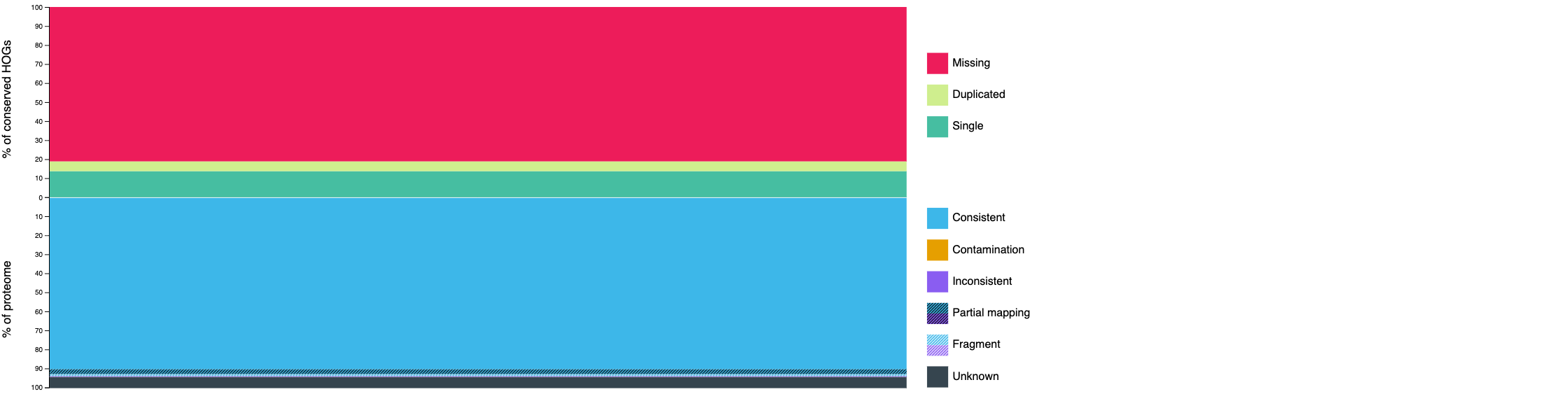
Metric Count Percentage Ancestral clade
Brassicaceae
–
Conserved HOGs assessed
17,996
–
Completeness
3,391
18.84%
Single-copy
2,465
13.70%
Duplicated (expected)
124
0.69%
Duplicated (unexpected)
802
4.46%
Missing
14,605
81.16%
The low completeness (~19%) is expected because we submitted only chromosome 2 proteins (~6,000 out of ~39,000 total). A full-proteome run would show completeness >95% for a high-quality Arabidopsis annotation.
Whole-proteome consistency
Category Count Percentage Consistent lineage placement
5,770
93.71%
partial hits
160
2.60%
fragmented
65
1.06%
Inconsistent lineage placement
32
0.52%
partial hits
17
0.28%
fragmented
10
0.16%
Contamination
0
0.00%
Total Unknown
355
5.77%
The high consistency score (93.71%) and zero contamination confirm that the chromosome 2 proteins are correctly assigned to Brassicaceae with no foreign sequences present.
Comparison view

The comparison view allows side-by-side evaluation of multiple proteomes or annotation versions, useful for benchmarking gene prediction pipelines.
Summary
Tool Input Key Output EDTA
Assembled genome (FASTA)
TE library, GFF3 annotation, masked genome
OMArk
Predicted proteome (FASTA)
Completeness, consistency, and contamination scores
Together, EDTA and OMArk provide a comprehensive picture of both the repetitive landscape and the protein-coding gene space of a newly assembled genome.